The HTML that is produced by this control does not fit the design of the site I am creating. The control spits out a TABLE with rows that each hold 2 cells (td's).
I need a layout so the lables are on the row above each textbox.
It is that line I need to style. Good point however on the fact that this is a .NET control, and not an Umbraco one. I'll take my search for a solution further afield.
Styling an asp:LoginView ID="UmbracoLoginView"
I am using an asp:LoginView ID="UmbracoLoginView" on my site. It looks like this..
The HTML that is produced by this control does not fit the design of the site I am creating. The control spits out a TABLE with rows that each hold 2 cells (td's).
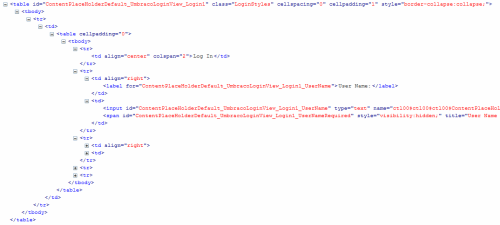
I need a layout so the lables are on the row above each textbox.
Like this..
How can I modfiy the default layout of this UmbracoLoginView control?
Hi Brad
Isn't what you're after what is already happening above? (My eyes may be bleeding too much to see it properly, though :)).
Just to make it clear the above is a standard ASP.NET loginView control, which is not related to Umbraco.
Are you aware that you could change the layout to be using a nice unordered list instead?
/Jan
No. what is happening above has the 2 tds in each row. so I get this.
User Name [<textbox>]
Password [<textbox]
What I need in my design is...
User Name
[<textbox>]
Password
[<textbox]
Each elemnet in it's own row (<tr>) in
The code that outputs each of these looks like this..
It is that line I need to style. Good point however on the fact that this is a .NET control, and not an Umbraco one. I'll take my search for a solution further afield.
Funny, the first solution I found, was related to Umbraco anyway..
styling-the-aspnet-login-controls
(this was a double post)
That Sebastiaan guy...full of good tips! :) - Glad you managed to find a solution to this, thanks for sharing.
/Jan
is working on a reply...
This forum is in read-only mode while we transition to the new forum.
You can continue this topic on the new forum by tapping the "Continue discussion" link below.